Showing posts with label aws news update. Show all posts

Wednesday, December 8, 2021

How to Enable AWS Security Hub?

What is a security Hub?

AWS Security Hub provides you with a comprehensive view of your security state in AWS and helps you check your environment against security industry standards and best practices.

Security Hub collects security data from across AWS accounts, services, and supported third-party partner products and helps you analyze your security trends and identify the highest priority security issues.


Here is a Demonstration video on AWS Security Hub👇👇


Benefits of AWS Security Hub

  • Reduced effort to collect and prioritize findings
  • Automatic security checks against best practices and standards
  • Consolidated view of findings across accounts and providers
  • Ability to automate remediation of findings


Enable AWS Security Hub

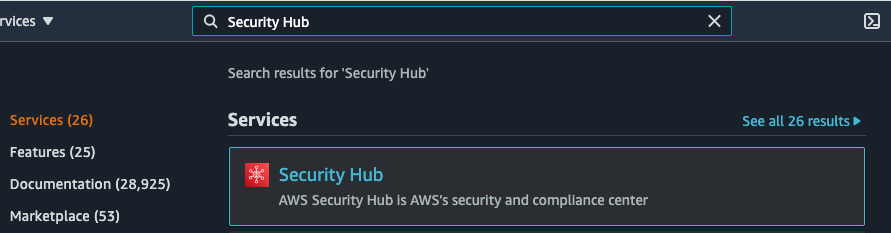
  • Once you have logged into your AWS account and enabled AWS Config, we need to enable Security Hub. Navigate to the AWS Security Hub console. Alternatively, you can just search for Security Hub and select the service.
  • In the AWS Security Hub service console you can click on the Go to Security Hub orange button to navigate to AWS Security Hub in your account.
  • Additional information is provided regarding Security standards and AWS Integrations. You can read more here. Now select Enable Security Hub.
  • With AWS Security Hub now enabled in your account, you can explore the security insights AWS Security Hub offers.

Why do you need to be AWS Certified?

What is AWS?

Amazon Web Services (AWS) is the world’s most comprehensive and broadly adopted cloud platform, offering over 200 fully-featured services from data centers globally. Millions of customers — including the fastest-growing startups, largest enterprises, and leading government agencies — are using AWS to lower costs, become more agile, and innovate faster.

HERE IS A FULLY DEDICATED VIDEO BASED ON "Why do you need to be AWS Certified"👇👇


Why AWS?

  • On the Go Pricing
  • The Free Tier
  • Performance
  • Deployment Speed
  • Security
  • Flexibility

Benefits of Getting an AWS Certification

Amazon Web Services (AWS) is the market leader among cloud service providers now. Why? It provides cost-effective services to organizations. The services of AWS are scalable and ideal for different business sizes.

Most important of all, AWS follows formidable security measures for safeguarding, monitoring, and maintenance of its data centers. As a result, AWS is staying at the top of the list of cloud service providers. So, the first reason to go for AWS certifications is the status of AWS. If you want to invest time and effort in learning about cloud technologies, then it’s better to choose the leader. 


Road Map of AWS Certification


Sunday, December 5, 2021

AWS new service AWS Private 5G

Amazon Web Services (AWS) announced the availability of a private 5G service for enterprises named AWS Private 5G.


Here is a fully dedicated video based on AWS Private 5G service👇👇


ABOUT AWS

Amazon Web Services (AWS) is the world’s most comprehensive and broadly adopted cloud platform, offering over 200 fully-featured services from data centers globally. Millions of customers — including the fastest-growing startups, largest enterprises, and leading government agencies — are using AWS to lower costs, become more agile, and innovate faster.


What is a Private Network?

A Private Mobile Network features network infrastructure which is used exclusively by devices authorized by the end user organisation. Typically, this is deployed in one or more specific locations which are owned or occupied by the end user organisation to deliver targeted coverage, capacity and other capabilities. Devices which are registered on public mobile networks will not work on the private network except where specifically authorised.


Benefits of Private networks?

  • Offering enterprises a greater level of control over deployment, security, equipment and device choices
  • Enabling highly targeted indoor/outdoor coverage
  • High and reserved capacity
  • Providing independence from public network

What are the benefits of AWS Private 5G?

This is a new managed service that helps enterprises set up and scale private 5G mobile networks in their facilities in days instead of months. With just a few clicks in the AWS console, customers specify where they want to build a mobile network and the network capacity needed for their devices. AWS then delivers and maintains the small cell radio units, servers, 5G core, and radio access network (RAN) software, and subscriber identity modules (SIM cards) required to set up a private 5G network and connect devices. AWS Private 5G automates the setup and deployment of the network and scales capacity on-demand to support additional devices and increase network traffic. There are no upfront fees or per-device costs with AWS Private 5G, and customers pay only for the network capacity and throughput they request.

Many enterprise networks are constrained by increasing growth in users, devices, and application demands. Increased video content, new applications that require ultra-low latency connectivity to end-user devices, and thousands of smart IoT devices demand extended coverage, more capacity, better reliability, and robust security and access control. Customers want to build their own private 5G networks to address these limitations, but private mobile network deployments require customers to invest considerable time, money, and effort to design their network for anticipated peak capacity, and procure and integrate software and hardware components from multiple vendors. Even if customers are able to get the network running, current private mobile network pricing models charge for each connected device and make it cost-prohibitive for use cases that involve thousands of connected devices. AWS Private 5G simplifies the procurement and deployment allowing customers to deploy their own 4G/LTE or 5G network within days instead of months, scale up and down the number of connected devices rapidly, and benefit from a familiar on-demand cloud pricing model.

AWS Private 5G is available in preview in the United States. To request access, visit the sign-up page here.

Tuesday, March 12, 2019

Aws news

Tag-on Create and Tag-Based IAM Application for Amazon Kinesis Data Firehose

Tag-on create is now available for Kinesis Data Firehose. Upon creation, you can tag your Amazon Kinesis Data Firehose from the AWS Management Console or using the AWS APIs. By tagging resources at the time of creation you can eliminate the need to run custom tagging scripts after resource creation.  

In addition, you can now set IAM policies on your Amazon Kinesis Data Firehose during creation using tags. This enables automated policy application to give you more granular control over who has access to Amazon Kinesis Data Firehose APIs. You can also enforce the use of tagging and can control which tag keys and values are set on your resources.

Visit the AWS User Documentation to learn more about tag-on create and tag-based IAM application for Amazon Kinesis Data Firehose.  

These capabilities are available at no additional cost in all AWS commercial regions where Amazon Kinesis Data Firehose is available.

https://aws.amazon.com/about-aws/whats-new/2019/03/tag-on-create-and-tag-based-iam-application-for-amazon-kinesis-data-firehose/

Tuesday, February 26, 2019

Aws news update

AWS Shield Increases Default Resource Limits For Advanced Protection

You can now use AWS Shield Advanced to get enhanced DDoS protection for even more resources. You can now protect up to a default limit of 1000 resources of each supported resource type: Amazon CloudFront distributions, Elastic Load Balancing load balancers, Amazon Route 53 hosted zones, Elastic IP addresses and AWS Global Accelerator accelerators. 

AWS Shield is a managed Distributed Denial of Service (DDoS) protection service that safeguards web applications running on AWS. There are two tiers of AWS Shield - Standard and Advanced. AWS Shield Standard is available on all AWS Regions and Amazon CloudFront edge locations. It is also enabled by default for all AWS customers to protect against several common infrastructure layer attacks. With AWS Shield Advanced, you get protection against more sophisticated and larger DDoS attacks, by enhanced detection and mitigation. With AWS Shield Advanced you also get near-real-time attack visibility, 24x7 access to the AWS DDoS Response Team (DRT) for escalations, and economic protections against DDoS-related usage spikes in your protected resources.

By default, you can now protect up to 5000 resources: 1000 Amazon CloudFront distributions, 1000 Elastic Load Balancing load balancers (Classic Load Balancers + Application Load Balancers), 1000 Amazon Route 53 hosted zones, 1000 Elastic IP addresses (can be associated with Network Load Balancers or Amazon EC2 instances) and 1000 AWS Global Accelerator accelerators.

Existing users of AWS Shield Advanced get their current limits automatically increased to 1000 for each resource type. If you want to increase these limits beyond 1000 each, please submit a ticket via the AWS Support Center.

https://aws.amazon.com/about-aws/whats-new/2019/02/aws-shield-advanced-increases-default-resource-limits/

Aws news update

Amazon Data Lifecycle Manager (DLM) Adds Support For Shorter Backup Intervals

Using Amazon Data Lifecycle Manager (DLM) policies, you can now schedule automated backups for your Amazon Elastic Block Store (EBS) volumes every 2, 3, 4, 6, or 8 hours (in addition to the currently supported 12 or 24 hours).

We launched DLM in July 2018 to enable automation of creation and retention of EBS volume snapshots via policies. Since then, we have made DLM easier to use with automatic copy of tags from source volume to snapshots and CloudFormation support for DLM policies. Today, we are adding a wider selection of backup intervals to support more frequent backups.

The new scheduling options allow you to take more frequent backups to meet shorter Recovery Point Objectives (RPO) and Recovery Time Objectives (RTO). To use the newly supported intervals, customers can either modify existing lifecycle policies or create new policies.

https://aws.amazon.com/about-aws/whats-new/2019/02/amazon-data-lifecycle-manager-adds-support-for-shorter-backup-intervals/

Aws news update

Amazon RDS for MySQL and MariaDB Now Support T3 Instance Types

You can now launch T3 instance types when using Amazon Relational Database Service (RDS) for MySQL and Amazon RDS for MariaDB. Amazon EC2 T3 instances are the next generation burstable general-purpose instance type that provide a baseline level of CPU performance with the ability to burst CPU usage for any period of time, whenever and however long required.

T3 instances offer a balance of compute, memory, and network resources and are ideal for database workloads with moderate CPU usage that experience temporary spikes in use. T3 instances accumulate CPU credits when a workload is operating below the baseline. Each earned CPU credit provides the T3 instance the opportunity to burst with the performance of a full CPU core for a minute. Amazon RDS T3 instances are configured for Unlimited Mode, which means they can burst beyond the baseline over a 24-hour window for an additional charge. 

You can scale up to the new instance types by modifying your existing DB instance in the AWS RDS Management Console. Refer to the Amazon RDS User Guide for more details.

Review the Amazon RDS pricing page for pricing details and regional availability.

https://aws.amazon.com/about-aws/whats-new/2019/02/amazon-rds-for-mysql-and-mariadb-now-support-t3-instance-types/

Aws news update

AWS Resource Groups Tag Editor Is Now Available in the AWS Europe (Stockholm) Region

AWS Resource Groups makes it easier to manage and automate tasks on large numbers of AWS resources at one time. AWS Resource Groups Tag Editor allows you to add tags to – or edit or delete tags of – multiple AWS resources at once. With Tag Editor, you can search for the resources that you want to tag, and then manage tags for the resources in your search results. Starting today, AWS Resource Groups Tag Editor is available in the AWS Europe (Stockholm) Region.

AWS Resource Groups Tag Editor, which can be found in the navigation bar of the AWS Management Console (under Resource Groups), is available in Asia Pacific (Singapore), Asia Pacific (Mumbai), Asia Pacific (Seoul), Asia Pacific (Sydney), Asia Pacific (Tokyo), Europe (Frankfurt), Europe (Ireland), Europe (London), Europe (Stockholm), Europe (Paris), South America (São Paulo), US East (Northern Virginia), US East (Ohio), US West (Northern California), and US West (Oregon).

AWS Resource Groups supports 120 AWS resources. AWS Resource Groups Tag Editor supports 40 AWS resources. You can start creating your own resource groups with the help of our documentation.

Share your feedback with us! Let us know which AWS resources you’d like us to offer in the next release! Your input helps shape our roadmap, so that we can better meet your needs. If you have questions or suggestions, please leave a comment.

https://aws.amazon.com/about-aws/whats-new/2019/02/aws-resource-groups-tag-editor-is-now-available-in-the-aws-europ/

Aws news update

Amazon RDS for MySQL and MariaDB Now Support R5 Instance Types

You can now launch R5 instance types when using Amazon Relational Database Service (RDS) for MySQL and Amazon RDS for MariaDB. Amazon EC2 R5 instances are the next generation of Amazon EC2 memory optimized instances. R5 instances are based on the Amazon EC2 Nitro System, a combination of dedicated hardware and lightweight hypervisor which delivers practically all of the compute and memory resources of the host hardware to your database instance.

With a 1:8 vCPU to memory ratio, R5 instances are well suited for running memory intensive database workloads including transaction processing, data warehousing, and analytics. R5 instances introduce a new larger instance size, r5.24xlarge, which provides 96 vCPUs and 768GiB of memory per instance. Depending on your workload, you may be able to achieve up to a 39% performance boost with R5 instances compared to R4 instances.

You can scale up to the new instance types by modifying your existing DB instance in the AWS RDS Management Console. Refer to the Amazon RDS User Guide for more details.

Review the Amazon RDS pricing page for pricing and regional availability.

https://aws.amazon.com/about-aws/whats-new/2019/02/amazon-rds-for-mysql-and-mariadb-now-support-r5-instance-types/

Aws news update

Amazon Kinesis Video Streams adds Synchronized Audio Video Playback and MPEG-TS Container Format Support via HTTP Live Streaming (HLS)

Amazon Kinesis Video Streams enables developers to use its fully-managed HLS capability for synchronized audio video (AV) playback and also output HLS streams in MPEG-TS container format. Developers can now ingest both audio and video in a single multi-track Kinesis Video stream and use HLS APIs to deliver pre-segmented files and playlists in fragmented MP4 (fMP4) and MPEG-TS container formats for playback on compatible mobile and web players.

As an increasing number of camera-enabled devices now include a microphone, developers want to ingest both audio and video data in a Kinesis Video stream and build player applications for synchronized AV playback. Developers can now enable this capability by ingesting both video (H.264) and audio (AAC) in a single multi-track Kinesis Video stream. As the media is ingested, developers can then use KVS HLS APIs to playback the ingested media in both live and on-demand mode. Kinesis Video Streams now also allows developers to deliver media in both fMP4 and MPEG-TS as the HLS output container, increasing compatibility with earlier generation platforms such as iOS9.

Please refer to the producer integration guide and the developer documentation to learn more about ingesting audio and video data in a single Kinesis Video stream.  

Refer to the AWS global region table for regional availability.

https://aws.amazon.com/about-aws/whats-new/2019/02/amazon-kinesis-video-streams-adds-synchronized-audio-video-playback-and-mpeg-ts-container-format-support-via-http-live-streaming-hls/

Aws news update

AWS Server Migration Service Adds Support for Importing Applications from AWS Migration Hub

AWS Server Migration Service now offers support for importing and migrating applications discovered by AWS Migration Hub. This new feature allows you to quickly migrate applications identified during discovery phase, eliminating the need to recreate groupings, and as a result, reduce the time to migrate and lower the risk of errors in the migration process. You can discover servers and create application groupings using the Migration Hub console, CLI, or CSV import, and use those groupings as-is within the Server Migration Service to perform application migration.

AWS Migration Hub provides a single location to track the progress of application migrations across multiple AWS and partner solutions.

AWS Server Migration Service is an agentless service which makes it easier and faster for you to migrate on-premises workloads to AWS from VMware vSphere and Microsoft Hyper-V environments. It offers multi-server support to enable coordinated migration of a group of servers, making it easier to coordinate large-scale server migrations.

There are no additional charges for AWS Migration Hub or AWS Server Migration Service. You pay only for the cost of the migration tools you use, and any resources being consumed on AWS. To learn more, visit AWS Migration Hub, AWS Server Migration Service (SMS) and the technical documentation page. All capabilities of Server Migration Service are offered free of cost. Customers only pay for the resources they use such as EBS and EC2. To learn more, visit AWS Migration Hub, AWS Server Migration Service (SMS) and the technical documentation page

https://aws.amazon.com/about-aws/whats-new/2019/02/AWS_Server_Migration_Service/

Aws news update

HuAmazon FSx for Windows File Server Now Supports On-Premises Access to File Systems and Supports Access Across AWS VPCs, Accounts, and Regions

Amazon FSx for Windows File Server, a service that provides fully-managed native Microsoft Windows file systems, now allows you to access your file systems from on-premises via an AWS Direct Connect or AWS VPN connection. Additionally, it now allows you to access your file systems from multiple Amazon Virtual Private Clouds (VPCs), AWS accounts, and AWS Regions via VPC Peering or AWS Transit Gateway. 

With on-premises access, you can easily migrate your on-premises data sets to Amazon FSx, use Amazon FSx for hosting user shares accessible by on-premises end-users, and use Amazon FSx for backup and disaster recovery solutions. With inter-VPC, inter-account, and inter-Region access, you can share your file data sets across multiple applications, internal organizations, or environments spanning multiple VPCs, accounts, or Regions. 

These new access capabilities are now available at no additional cost for all new file systems in all regions where Amazon FSx is available. You will be billed for any Direct Connect, VPN, or VPC Peering connections, or any Transit Gateway attachments that you create, as well as associated data transfer fees. To learn more about Amazon FSx for Windows File Server visit here. To learn more about the new access capabilities visit here.

https://aws.amazon.com/about-aws/whats-new/2019/02/amazon-fsx-for-windows-file-server-now-supports-on-premises-access/

Top ChatGPT Prompts for DevOps Engineers

  As a DevOps engineer, your role involves juggling complex tasks such as automation, infrastructure management, CI/CD pipelines, and troubl...